
Best MSI Gaming Laptops (2026): 10 Picks by Specs
This guide answers one question first: the top pick among MSI gaming laptops is the MSI Titan 18, because it carries a GeForce RTX 5090 with 24GB of graphics memory, the most in this list, alongside 64GB of RAM and an 18-inch screen. The rest of the guide compares 10 MSI laptops on the specifications stated in each listing and on their live prices. The ordering rule ranks first by graphics memory, then by RAM, then by refresh rate, with ties broken in listing order.
10 picks from 9 laptops that match this guide with a price we can quote today. Every price below is live and carries the moment it was read.
The picks at a glance
Which one should you buy?
- For a player who wants the most graphics memory in the list: A player who wants the largest graphics memory pool in the shortlist will find it on the Titan 18, which states 24GB on the RTX 5090. See pick 1
- For a player who streams while playing with voice chat and a browser open: The Vector A16 HX states 64GB of RAM, giving room for the game, a stream, voice chat and a browser at the same time. See pick 2
- For a player who carries the laptop to a friend's place: At a stated 2.7kg, the Vector 16 HX AI is tied for the lightest weight in the list, and its 16-inch screen keeps the footprint smaller than the 18-inch models. See pick 6
- For a player who wants a large screen at a high refresh rate: The Crosshair 18 HX AI pairs an 18-inch display with a 240Hz refresh rate and 64GB of RAM. See pick 7
The 10 picks
1 Most graphics memory in this list at 24GB

msi Titan 18" Gaming Laptop
- CPU
- Intel Core Ultra 9 290HX
- GPU
- GeForce RTX 5090
- GPU memory
- 24 GB
- RAM
- 64 GB
- Storage
- 2000 GB
- Screen
- 18 in
- Refresh
- 120 Hz
- Weight
- 3.6 kg
$7,699.00 price as of 2026-10-10 02:23 UTC (Details)
The Titan 18 leads because it offers the most graphics memory here at 24GB, ahead of the 16GB models. It also pairs that GPU with 64GB of RAM, an 18-inch screen and 2TB of storage. Its 120Hz refresh rate is lower than the 240Hz screens elsewhere, but the graphics memory and RAM totals put it first under the ordering rule.
Pros
- 24GB of graphics memory, the most in this list
- 64GB of RAM
- 18-inch screen
- 2TB of storage
Cons
- 120Hz refresh rate, lower than every other pick
- Heaviest stated weight in the list at 3.6kg
Good fit if
- A player who wants the largest graphics memory pool in this guide
- A player who wants 64GB of RAM and an 18-inch screen in one machine
Skip if
- A player who wants the 240Hz refresh rate all other picks share
- A player who wants a lighter laptop than 3.6kg
Verdict: The MSI Titan 18 tops this list because its 24GB graphics memory and 64GB RAM are the highest amounts stated in the pool.
2 64GB RAM and 16GB of graphics memory

msi Vector A16 HX 16" QHD+ 240Hz Gaming Laptop
- CPU
- AMD Ryzen 9 8940HX
- GPU
- GeForce RTX 5080
- GPU memory
- 16 GB
- RAM
- 64 GB
- Storage
- 2000 GB
- Screen
- 16 in
- Refresh
- 240 Hz
- Weight
- 2.7 kg
$3,348.99 price as of 2026-10-10 02:23 UTC (Details)
This Vector A16 HX ranks second because it combines 16GB of graphics memory with 64GB of RAM, tied with the model that follows. Both this Vector and the next Vector 16 HX AI state the same GPU, RAM, refresh rate and weight, so the order in the pool file separates them.
Pros
- 64GB of RAM, tied for the most here
- GeForce RTX 5080 with 16GB of graphics memory
- 240Hz refresh rate
- 2.7kg stated weight, tied for the lightest in the list
Cons
- 16-inch screen is smaller than the 18-inch models
- Storage is listed as 2TB, below the 4TB model that follows
Good fit if
- A player who wants 64GB of RAM alongside a 16GB graphics card
- A player who wants a 240Hz screen and a 16-inch display
Skip if
- A player who wants an 18-inch screen
- A player who wants the 24GB graphics memory of the Titan 18
Verdict: The Vector A16 HX is a strong second pick for anyone who wants a 64GB laptop with an RTX 5080 and 240Hz.
3 64GB RAM and 4TB of storage

msi Vector 16 HX AI 16" QHD+ 240Hz Gaming Laptop
- CPU
- Intel Core Ultra 9 275HX
- GPU
- GeForce RTX 5080
- GPU memory
- 16 GB
- RAM
- 64 GB
- Storage
- 4000 GB
- Screen
- 16 in
- Refresh
- 240 Hz
- Weight
- 2.7 kg
$6,699.00 price as of 2026-10-10 02:23 UTC (Details)
This Vector 16 HX AI is next because it matches the Vector A16 HX on graphics memory, RAM, refresh rate and weight, with the pool file order placing it afterward. Its distinction is 4TB of storage, the most stated in this list.
Pros
- 64GB of RAM, tied for the most here
- GeForce RTX 5080 with 16GB of graphics memory
- 4TB of storage, the most in this list
- 240Hz refresh rate
Cons
- 16-inch screen is smaller than the 18-inch models
- Same core GPU, RAM and refresh rate as the pick above, so storage separates them
Good fit if
- A player who wants the largest storage capacity in this guide
- A player who wants 64GB of RAM and 16GB of graphics memory
Skip if
- A player who does not need 4TB of storage
- A player who prefers an 18-inch screen
Verdict: This Vector 16 HX AI stands out for its 4TB drive while offering the same high memory totals as the model ranked just above it.
4 16GB graphics memory and 32GB RAM
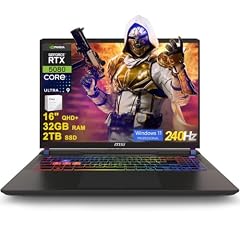
msi Vector 16 HX AI Gaming Laptop 16" QHD+ IPS 240Hz Intel 24-core Ultra
- CPU
- Intel Core Ultra 9 275HX
- GPU
- GeForce RTX 5080
- GPU memory
- 16 GB
- RAM
- 32 GB
- Storage
- 2000 GB
- Screen
- 16 in
- Refresh
- 240 Hz
- OS
- Windows 11 Pro
$2,969.00 price as of 2026-10-10 02:23 UTC (Details)
This Vector 16 HX AI ranks after the 64GB models because its 32GB RAM is lower. It still has 16GB of graphics memory, a 240Hz screen and 2TB of storage, which keeps it ahead of the 12GB and 8GB graphics memory picks below.
Pros
- GeForce RTX 5080 with 16GB of graphics memory
- 32GB of RAM
- 240Hz refresh rate
- 2TB of storage
Cons
- No weight stated by the seller
- 32GB RAM is less than the 64GB models above
- 16-inch screen is smaller than the 18-inch options
Good fit if
- A player who wants a 16GB graphics card with 32GB of RAM
- A player who wants a 240Hz screen and 2TB of storage
Skip if
- A player who wants 64GB of RAM
- A player who wants an 18-inch screen
Verdict: This Vector 16 HX AI is a well-rounded RTX 5080 pick for players who want 16GB of graphics memory without moving up to 64GB of RAM.
5 RTX 5080 with 16GB of graphics memory

msi Vector 16 HX AI 400 Gaming Laptop
- CPU
- Intel Core Ultra 9
- GPU
- RTX 5080
- GPU memory
- 16 GB
- RAM
- 32 GB
- Storage
- 1000 GB
- Screen
- 16 in
- Refresh
- 240 Hz
- Weight
- 2.7 kg
$2,809.00 price as of 2026-10-10 02:23 UTC (Details)
This Vector 16 HX AI 400 has the same graphics memory and RAM as the pick above, and a 240Hz refresh rate. It comes later in the pool file order, and its listing omits an operating system while stating 1TB of storage.
Pros
- RTX 5080 with 16GB of graphics memory
- 32GB of RAM
- 240Hz refresh rate
- 2.7kg stated weight, tied for the lightest in the list
Cons
- Operating system not stated by the seller
- 1TB storage is the smallest amount stated in this list
- 16-inch screen is smaller than the 18-inch models
Good fit if
- A player who wants a 16GB graphics card with a stated 2.7kg weight
- A player who wants a 240Hz screen and 32GB of RAM
Skip if
- A player who wants the operating system stated in the listing
- A player who wants more than 1TB of storage
Verdict: The Vector 16 HX AI 400 offers the same RTX 5080 memory tier as the previous pick, but the missing OS specification and smaller storage keep it below.
6 RTX 5070 Ti with 12GB graphics memory

msi Vector 16 HX AI 16" 240Hz QHD+ Gaming Laptop
- CPU
- AMD Ryzen 9 8940HX
- GPU
- GeForce RTX 5070 Ti
- GPU memory
- 12 GB
- RAM
- 32 GB
- Storage
- 1000 GB
- Screen
- 16 in
- Refresh
- 240 Hz
- Weight
- 2.7 kg
This is the only RTX 5070 Ti in the pool, with 12GB of graphics memory, so it sits after the 16GB models and before the 8GB models. It also states 32GB of RAM, a 240Hz refresh rate, a 16-inch screen and a 2.7kg weight.
Pros
- GeForce RTX 5070 Ti with 12GB of graphics memory
- 32GB of RAM
- 240Hz refresh rate
- 2.7kg stated weight, tied for the lightest in the list
Cons
- 12GB graphics memory is less than the 16GB models above
- 1TB storage is the smallest amount stated in this list
- 16-inch screen is smaller than the 18-inch models
Good fit if
- A player who wants an RTX 5070 Ti with 12GB of graphics memory
- A player who wants a stated 2.7kg weight and a 240Hz screen
Skip if
- A player who wants more than 12GB of graphics memory
- A player who wants more than 1TB of storage
Verdict: This Vector 16 HX AI occupies the middle of the list as the sole RTX 5070 Ti model in the pool.
7 18-inch screen with 64GB of RAM

MSI Crosshair 18 HX AI Gaming Laptop 18" QHD+ 240Hz
- CPU
- Intel Core Ultra 9 275HX
- GPU
- GeForce RTX 5070
- GPU memory
- 8 GB
- RAM
- 64 GB
- Storage
- 1000 GB
- Screen
- 18 in
- Refresh
- 240 Hz
- OS
- Windows 11
$2,499.00 price as of 2026-10-10 02:23 UTC (Details)
Among the 8GB graphics memory models, this Crosshair 18 HX AI ranks first because it states 64GB of RAM, the most in that group. It also offers an 18-inch screen, a 240Hz refresh rate and 1TB of storage.
Pros
- 64GB of RAM, tied for the most here
- 18-inch screen
- 240Hz refresh rate
- 1TB of storage
Cons
- 8GB graphics memory is the smallest amount stated in the list
- Weight not stated by the seller
- 1TB storage is one of the smallest amounts stated here
Good fit if
- A player who wants an 18-inch screen with 64GB of RAM
- A player who wants a 240Hz screen and plenty of memory
Skip if
- A player who wants more than 8GB of graphics memory
- A player who wants a stated weight in the listing
Verdict: This Crosshair 18 HX AI leads the 8GB graphics memory group because of its 64GB RAM and large 18-inch display.
8 18-inch screen with 32GB RAM and 2TB storage

msi Crosshair 18 HX AI Gaming Laptop 18" QHD+ 240Hz 100% DCI-P3 Intel
- CPU
- Intel Core Ultra 9 275HX
- GPU
- GeForce RTX 5070
- GPU memory
- 8 GB
- RAM
- 32 GB
- Storage
- 2000 GB
- Screen
- 18 in
- Refresh
- 240 Hz
- OS
- Windows 11 Pro
$2,229.99 price as of 2026-10-10 02:23 UTC (Details)
This Crosshair follows the 64GB model because its 32GB RAM is lower. It has the same 8GB graphics memory, 18-inch screen and 240Hz refresh rate, while its 2TB storage is higher than the 1TB Crosshair below.
Pros
- 18-inch screen
- 32GB of RAM
- 240Hz refresh rate
- 2TB of storage
Cons
- 8GB graphics memory is the smallest amount stated in the list
- Weight not stated by the seller
Good fit if
- A player who wants an 18-inch screen with 32GB of RAM
- A player who wants 2TB of storage and a 240Hz display
Skip if
- A player who wants more than 8GB of graphics memory
- A player who wants a stated weight in the listing
Verdict: This Crosshair 18 HX AI is a strong 18-inch 240Hz option with 32GB RAM and a 2TB drive.
9 18-inch screen with 32GB RAM and 1TB storage

msi Crosshair 18 HX AI Gaming Laptop 18" QHD+ 240Hz 100% DCI-P3 Intel
- CPU
- Intel Core Ultra 9 275HX
- GPU
- GeForce RTX 5070
- GPU memory
- 8 GB
- RAM
- 32 GB
- Storage
- 1000 GB
- Screen
- 18 in
- Refresh
- 240 Hz
- Weight
- 3.1 kg
$2,149.99 price as of 2026-10-10 02:23 UTC (Details)
This is the second 32GB Crosshair in the list, matching the model above on GPU, RAM, refresh rate and screen size. The pool file order places it after the 2TB version, and it states 1TB of storage and a 3.1kg weight.
Pros
- 18-inch screen
- 32GB of RAM
- 240Hz refresh rate
- Stated weight of 3.1kg
Cons
- 8GB graphics memory is the smallest amount stated in the list
- 1TB storage is the smallest amount stated here
- 3.1kg stated weight is heavier than the 2.7kg models
Good fit if
- A player who wants an 18-inch screen with 32GB of RAM
- A player who wants a stated weight in the listing
Skip if
- A player who wants more than 1TB of storage
- A player who wants more than 8GB of graphics memory
Verdict: This Crosshair 18 HX AI is essentially the 2TB version with 1TB of storage and a stated 3.1kg weight.
10 18-inch screen with 16GB RAM

msi Crosshair 18 HX AI Gaming Laptop 18" QHD+ 240Hz 100% DCI-P3 Intel
- CPU
- Intel Core Ultra 9 275HX
- GPU
- GeForce RTX 5070
- GPU memory
- 8 GB
- RAM
- 16 GB
- Storage
- 2000 GB
- Screen
- 18 in
- Refresh
- 240 Hz
- Weight
- 3.1 kg
$2,139.00 price as of 2026-10-10 02:23 UTC (Details)
This Crosshair 18 HX AI ranks last because its 16GB RAM is the lowest in the list. It still offers an 18-inch screen, a 240Hz refresh rate, 2TB of storage and a stated 3.1kg weight.
Pros
- 18-inch screen
- 240Hz refresh rate
- 2TB of storage
- Windows 11 Pro listed
Cons
- 8GB graphics memory is the smallest amount stated in the list
- 16GB RAM is the least RAM in this list
- 3.1kg stated weight is heavier than the 2.7kg models
Good fit if
- A player who wants an 18-inch screen at 240Hz
- A player who wants 2TB of storage in a large-screen MSI laptop
Skip if
- A player who wants more than 16GB of RAM
- A player who wants more than 8GB of graphics memory
Verdict: This Crosshair 18 HX AI closes the list with the lowest RAM total here, despite its large screen and 240Hz refresh rate.
Side by side
| # | Laptop | CPU | GPU | GPU memory | Rentable GPU model | RAM | Storage |
|---|---|---|---|---|---|---|---|
| 1 | msi Titan 18" Gaming Laptop | Intel Core Ultra 9 290HX | GeForce RTX 5090 | 24 GB | not stated | 64 GB | 2000 GB |
| 2 | msi Vector A16 HX 16" QHD+ 240Hz Gaming Laptop | AMD Ryzen 9 8940HX | GeForce RTX 5080 | 16 GB | not stated | 64 GB | 2000 GB |
| 3 | msi Vector 16 HX AI 16" QHD+ 240Hz Gaming Laptop | Intel Core Ultra 9 275HX | GeForce RTX 5080 | 16 GB | not stated | 64 GB | 4000 GB |
| 4 | msi Vector 16 HX AI Gaming Laptop 16" QHD+ IPS 240Hz Intel 24-core Ultra | Intel Core Ultra 9 275HX | GeForce RTX 5080 | 16 GB | not stated | 32 GB | 2000 GB |
| 5 | msi Vector 16 HX AI 400 Gaming Laptop | Intel Core Ultra 9 | RTX 5080 | 16 GB | not stated | 32 GB | 1000 GB |
| 6 | msi Vector 16 HX AI 16" 240Hz QHD+ Gaming Laptop | AMD Ryzen 9 8940HX | GeForce RTX 5070 Ti | 12 GB | not stated | 32 GB | 1000 GB |
| 7 | MSI Crosshair 18 HX AI Gaming Laptop 18" QHD+ 240Hz | Intel Core Ultra 9 275HX | GeForce RTX 5070 | 8 GB | not stated | 64 GB | 1000 GB |
| 8 | msi Crosshair 18 HX AI Gaming Laptop 18" QHD+ 240Hz 100% DCI-P3 Intel | Intel Core Ultra 9 275HX | GeForce RTX 5070 | 8 GB | not stated | 32 GB | 2000 GB |
| 9 | msi Crosshair 18 HX AI Gaming Laptop 18" QHD+ 240Hz 100% DCI-P3 Intel | Intel Core Ultra 9 275HX | GeForce RTX 5070 | 8 GB | not stated | 32 GB | 1000 GB |
| 10 | msi Crosshair 18 HX AI Gaming Laptop 18" QHD+ 240Hz 100% DCI-P3 Intel | Intel Core Ultra 9 275HX | GeForce RTX 5070 | 8 GB | not stated | 16 GB | 2000 GB |
How we picked
The pool for this guide holds 10 MSI gaming laptops from the shared catalogue. The pool rule is that every pick must be an MSI model whose listing states a dedicated graphics card with at least 4GB of graphics memory and at least 16GB of RAM. Because the pool has 10 laptops and this guide covers all of them, every machine that matches the rule appears below. The 10 laptops are compared on the specifications stated in each listing and on live prices. The picks are ranked by stated graphics memory first, then stated RAM, then screen refresh rate, with ties broken by the order in the pool file. That order puts the 24GB MSI Titan 18 at the front.
How to choose
What the graphics card and its memory decide
The graphics card does most of the work when a game draws a scene. In this list, the stated GPUs are the GeForce RTX 5090, GeForce RTX 5080, GeForce RTX 5070 Ti and GeForce RTX 5070, all part of the GeForce RTX 50 Series laptop family.
The amount of graphics memory sets a limit on how large and detailed the textures and scenes a game can hold. The picks here range from 8GB on the RTX 5070 models to 24GB on the RTX 5090 Titan. A larger number does not promise a specific game speed, but it gives the GPU more room for detailed scenes.
Refresh rate: what the screen can redraw
Refresh rate is how many times per second a screen can redraw. Nine of the 10 picks state a 240Hz screen; the MSI Titan 18 states 120Hz.
A higher refresh rate is the specification competitive players look for, but a laptop can only show extra frames when the game itself delivers them. The refresh rate is a screen specification, not a measure of how many frames any game will produce.
RAM when the game, voice chat and a stream run together
RAM is the workspace where a game, launcher, browser, voice chat and streaming or capture program can sit at the same time. In this pool, RAM runs from 16GB on one 18-inch Crosshair to 64GB on several high-end picks.
Four laptops state 64GB, five state 32GB and one states 16GB. A player who keeps many programs open while playing will likely want more RAM, though the amount any specific game uses is not stated in this catalogue.
Screen size and weight when the laptop travels
The list splits between 16-inch and 18-inch screens. Larger screens show more of the game at once, which matters for players who prefer a bigger view.
The stated weights are 2.7kg, 3.1kg and 3.6kg; some listings do not state a weight. If the laptop travels to a friend's place or another room, the 2.7kg models are the lighter choices in this list.
Storage and operating system: what the listings state
Storage is the room for the game library. The pool states 1TB, 2TB or 4TB drives, and all 10 picks exceed the 64GB minimum storage listed in Microsoft's Windows 11 system requirements.
Most picks list Windows 11 Pro, two list Windows 11, and one listing does not state the operating system. The OS is worth checking when a buyer has a preference between the standard and Pro editions.
What this guide leaves out (and why)
This guide compares laptops on the specifications each seller states and on live prices. Because the catalogue does not include performance measurements, the comparison only covers what each listing states: graphics card, graphics memory, RAM, storage, screen, weight and operating system.
Questions
How are these MSI gaming laptops ranked?
Picks are ordered by stated graphics memory first, then stated RAM, then screen refresh rate. The guide compares the 10 laptops on specifications from each listing and on live prices. Ties are broken by the order in the pool file. No laptop is ranked by price, popularity or the seller's description.
Does this guide cover frame rates, fan noise or battery life?
No. The catalogue provides no data on frame rates, fan noise, heat, throttling, battery life or charging speed. This guide compares only what each listing states, such as graphics card, graphics memory, RAM, storage, screen and weight, along with live prices. The site does not guess at performance results.
What does graphics memory do for gaming?
Graphics memory holds the textures and scene data a graphics card draws. More of it can allow a game to use larger and more detailed scenes, while less can limit the detail a card can keep available. In this list the amounts run from 8GB to 24GB. The specification does not promise a particular frame rate.
How much RAM do I need for gaming?
There is no single answer because the listing does not state what any game requires. RAM is the workspace for the game, launcher, browser, voice chat and streaming programs at once. This pool has 16GB, 32GB or 64GB models. Players who keep many programs open are likely to want more RAM.
Is a higher refresh rate always better?
A higher refresh rate lets the screen redraw more times per second, which is a spec competitive players often look for. The benefit shows only when the game itself delivers enough frames per second to use the extra refresh rate. The listing does not state frame rates for any game.
What Windows version do these MSI laptops state?
Most listings state Windows 11 Pro, two list Windows 11, and one listing does not state an operating system. The MSI Titan 18, all but one of the Vector models with a stated OS, and several Crosshair models list Windows 11 Pro. A buyer who needs Pro features should check the listing.
Recent updates
- : First published.