
Best Gaming Laptops Under $3,000 (2026): 4 Picks
For a gaming laptop under $3,000, the top pick is the MSI Vector 16 HX AI, a 16-inch laptop with a GeForce RTX 5080, 16GB of dedicated graphics memory, 32GB of RAM, a 240Hz screen, and 2TB of storage. It leads this guide because it has the most graphics memory and the highest refresh rate of the four picks. The rest of the list is compared on the specifications stated in each listing and on live prices, so the ranking rests on graphics memory, RAM, and refresh rate rather than on claims.
4 picks from 6 laptops that match this guide with a price we can quote today. Every price below is live and carries the moment it was read.
The picks at a glance
| # | Pick | Laptop | Price |
|---|---|---|---|
| 1 | 16GB graphics memory plus a 240Hz screen | msi Vector 16 HX AI Gaming Laptop 16" QHD+ IPS 240Hz Intel 24-core Ultra | $2,969.00 price as of 2026-10-10 02:23 UTC (Details) |
| 2 | 64GB of RAM with an 8GB GPU | Lenovo ThinkPad P16v Gen 2 Mobile Workstation Laptop | $2,999.99 price as of 2026-10-10 02:23 UTC (Details) |
| 3 | 8GB GPU with a stated 1.86kg weight | Lenovo ThinkPad P1 Gen 7 | $2,999.60 price as of 2026-10-10 02:23 UTC (Details) |
| 4 | Lightest pick here with 64GB of RAM | Lenovo ThinkPad P15 Mobile Workstation | $2,999.00 price as of 2026-10-10 02:23 UTC (Details) |
Which one should you buy?
- For a player who wants the most graphics memory and the fastest screen in the list: This player wants a large graphics memory buffer for detailed scenes and a 240Hz display for fast-moving games. The MSI Vector 16 HX AI is the only pick with 16GB of graphics memory and the only one with a 240Hz refresh rate. See pick 1
- For a player who keeps many programs open while playing: This player runs the game with voice chat, a browser, and streaming software at the same time. The ThinkPad P16v combines 64GB of RAM with an 8GB dedicated graphics card. See pick 2
- For a player who wants a lighter 16-inch laptop: This player wants a 16-inch screen in a chassis that is easier to carry. The ThinkPad P1 states a 1.86kg weight with 8GB of graphics memory and 32GB of RAM. See pick 3
- For a player who wants the lightest stated chassis and maximum RAM: This player accepts a 15.6-inch screen and 4GB of graphics memory to get the lowest listed weight and 64GB of RAM. The ThinkPad P15 is that pick. See pick 4
The 4 picks
1 16GB graphics memory plus a 240Hz screen
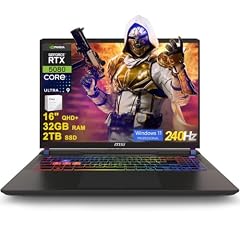
msi Vector 16 HX AI Gaming Laptop 16" QHD+ IPS 240Hz Intel 24-core Ultra
- CPU
- Intel Core Ultra 9 275HX
- GPU
- GeForce RTX 5080
- GPU memory
- 16 GB
- RAM
- 32 GB
- Storage
- 2000 GB
- Screen
- 16 in
- Refresh
- 240 Hz
- OS
- Windows 11 Pro
$2,969.00 price as of 2026-10-10 02:23 UTC (Details)
This pick leads the list because its stated graphics memory is 16GB, ahead of the 8GB and 4GB cards in the other picks. It also has the only 240Hz screen in the pool, 32GB of RAM, and 2TB of storage. For a gaming laptop in this price window, that combination is the strongest on the specs this guide ranks.
Pros
- 16GB of graphics memory, the most in this list
- 240Hz refresh rate, the highest in this list
- 32GB of RAM and 2TB of storage
- 16-inch screen and Windows 11 Pro
Cons
- Weight is not stated by the seller
- 32GB of RAM, less than the 64GB in two other picks
Good fit if
- For a player who wants the largest graphics memory buffer in this price window
- For a player who wants a 240Hz screen and 2TB of storage
Skip if
- For a player who needs a weight stated in the catalogue entry
- For a player who prefers to start with more than 32GB of RAM
Verdict: This is the top pick for a player who wants the largest graphics memory buffer and the highest refresh rate in this list.
2 64GB of RAM with an 8GB GPU

Lenovo ThinkPad P16v Gen 2 Mobile Workstation Laptop
- CPU
- Intel Core Ultra 7 165H
- GPU
- RTX 2000 Ada
- GPU memory
- 8 GB
- RAM
- 64 GB
- Storage
- 1000 GB
- Screen
- 16 in
- Refresh
- 60 Hz
- Battery
- 90 Wh
$2,999.99 price as of 2026-10-10 02:23 UTC (Details)
It ranks second because its 8GB of graphics memory ties with the ThinkPad P1, and its 64GB of RAM ties for the most memory in the list. The screen refresh rate is stated at 60Hz, so players who want faster redraws should look to the top pick.
Pros
- 64GB of RAM, tied for the most in this list
- 8GB of dedicated graphics memory
- 1TB of storage and Windows 11 Pro
- 16-inch screen with a stated 90Wh battery capacity
Cons
- 60Hz screen, the lowest stated refresh rate in this list
- 1TB storage, the smallest storage in this list
- Weight is not stated by the seller
Good fit if
- For a player who wants maximum RAM headroom with an 8GB graphics card
- For a player who keeps the game, voice chat, a browser, and streaming software open together
Skip if
- For a player who wants a stated refresh rate above 60Hz
- For a player who needs more than 1TB of storage stated in the same system
Verdict: The ThinkPad P16v is the memory-heavy pick when 64GB of RAM matters more than screen refresh rate.
3 8GB GPU with a stated 1.86kg weight

Lenovo ThinkPad P1 Gen 7
- CPU
- Intel Core Ultra 7
- GPU
- RTX 3000 Ada
- GPU memory
- 8 GB
- RAM
- 32 GB
- Screen
- 16 in
- Weight
- 1.86 kg
$2,999.60 price as of 2026-10-10 02:23 UTC (Details)
It ranks after the ThinkPad P16v because both state 8GB of graphics memory and this pick states 32GB of RAM versus 64GB. The RTX 3000 Ada GPU, 16-inch screen, and stated 1.86kg weight make it a compact alternative in the list.
Pros
- 8GB of dedicated graphics memory
- 32GB of RAM
- Stated weight of 1.86kg for a 16-inch laptop
- 16-inch screen
Cons
- Screen refresh rate is not stated by the seller
- Storage capacity is not stated by the seller
- Operating system is not stated by the seller
Good fit if
- For a player who wants a lighter 16-inch laptop with 8GB of graphics memory
- For a player who does not need the 64GB RAM or larger storage of other picks
Skip if
- For a player who wants a stated refresh rate
- For a player who wants storage and operating system stated in the catalogue entry
Verdict: The ThinkPad P1 balances an 8GB graphics card with a stated 1.86kg weight in a 16-inch chassis.
4 Lightest pick here with 64GB of RAM

Lenovo ThinkPad P15 Mobile Workstation
- CPU
- Intel Core i7-11850H
- GPU
- RTX A2000
- GPU memory
- 4 GB
- RAM
- 64 GB
- Storage
- 2000 GB
- Screen
- 15.6 in
- Weight
- 1.81 kg
- OS
- Windows 11 Pro
$2,999.00 price as of 2026-10-10 02:23 UTC (Details)
It ranks last because its 4GB of graphics memory is the lowest in the list. The rest of the stated specs are strong: 64GB of RAM, 2TB of storage, a 15.6-inch screen, and a 1.81kg weight, which makes it the lightest pick here.
Pros
- 64GB of RAM, tied for the most in this list
- 2TB of storage, tied for the largest in this list
- Stated weight of 1.81kg, the lightest here
- 15.6-inch screen with Windows 11 Pro
Cons
- 4GB of graphics memory, the lowest in this list
- Screen refresh rate is not stated by the seller
- 15.6-inch screen, the smallest in this list
Good fit if
- For a player who wants the lightest stated chassis and 64GB of RAM
- For a player who wants 2TB of storage and a 15.6-inch screen
Skip if
- For a player who wants more than 4GB of graphics memory for detailed scenes and textures
- For a player who wants a 16-inch screen or a stated high refresh rate
Verdict: The ThinkPad P15 is a light, memory-rich laptop that sits at the bottom here because of its 4GB graphics memory.
Side by side
| # | Laptop | CPU | GPU | GPU memory | Rentable GPU model | RAM | Storage |
|---|---|---|---|---|---|---|---|
| 1 | msi Vector 16 HX AI Gaming Laptop 16" QHD+ IPS 240Hz Intel 24-core Ultra | Intel Core Ultra 9 275HX | GeForce RTX 5080 | 16 GB | not stated | 32 GB | 2000 GB |
| 2 | Lenovo ThinkPad P16v Gen 2 Mobile Workstation Laptop | Intel Core Ultra 7 165H | RTX 2000 Ada | 8 GB | not stated | 64 GB | 1000 GB |
| 3 | Lenovo ThinkPad P1 Gen 7 | Intel Core Ultra 7 | RTX 3000 Ada | 8 GB | not stated | 32 GB | not stated |
| 4 | Lenovo ThinkPad P15 Mobile Workstation | Intel Core i7-11850H | RTX A2000 | 4 GB | not stated | 64 GB | 2000 GB |
How we picked
This guide covers 4 laptops from the catalogue. The selection rule is a price window and a stated dedicated graphics card with at least 4GB of graphics memory. Laptops are compared on the specifications stated in each listing and on live prices. Picks are ordered by stated graphics memory, most first; then by stated RAM, most first; then by stated screen refresh rate, highest first; ties are resolved by the order of the pool file. When a listing does not state a spec, the guide says so rather than guessing. The top pick is first because its 16GB of graphics memory leads the group.
How to choose
What the graphics card and its memory decide
The graphics card draws the game image, and the amount of graphics memory limits how large and detailed the scenes and textures it can hold at once. The catalogue states the GPU name and graphics memory for every pick, so this guide uses graphics memory as the first ranking rule. It does not rank GPU models beyond stated memory, and it does not claim a game will run at a particular setting.
Refresh rate: what the screen can redraw
The refresh rate states how many times per second the screen can redraw. A higher refresh rate is the screen spec that competitive players look for because fast motion is displayed in smaller time steps. That benefit appears only when the game itself delivers enough images per second to reach the screen rate. In this list, one pick states 240Hz, one states 60Hz, and two do not state a refresh rate.
RAM when the game, voice chat and a stream run together
RAM gives the system room for the game, a launcher, a browser, voice chat, and a capture or streaming program open at the same time. More RAM can make it easier to keep those programs running while playing. In this list, two picks state 64GB of RAM and two state 32GB, so memory headroom is one of the main differences after graphics memory.
Screen size and weight when the laptop travels
A larger screen shows more of the game, and a lighter laptop is easier to carry to a LAN event or between rooms. Three picks here state a 16-inch screen and one states a 15.6-inch screen. Weight is not stated for every pick; the two entries that state weights are 1.86kg and 1.81kg. Players who carry the laptop often should weigh those figures against the graphics memory and refresh rate they are willing to carry.
Operating system and storage for the game library
Operating system and storage also appear in the catalogue. Three picks state Windows 11 Pro, and one does not state an operating system. Storage gives room for the game library, updates, and other files: two picks state 2TB, one states 1TB, and one does not state a storage capacity. Choose more storage if the library grows quickly.
What this guide leaves out (and why)
The catalogue has no data for battery life, fan noise, thermals, keyboard feel, trackpad, speakers, webcam, or display quality in color and brightness terms. This guide does not guess at those figures. It compares the laptops on the specifications stated in each listing and on live prices. Players who need those details should look for a source that provides them.
Questions
Which laptop in this guide has the most graphics memory?
The MSI Vector 16 HX AI states 16GB of dedicated graphics memory. The ThinkPad P1 and ThinkPad P16v each state 8GB, and the ThinkPad P15 states 4GB. Because graphics memory is the first ranking rule in this guide, that figure is why the MSI Vector sits at the top of the list.
Does a higher refresh rate mean the laptop runs games faster?
No. Refresh rate describes what the screen can redraw in one second, not how fast the game runs. A 240Hz screen can show more images per second when the game delivers enough images to use it, but the catalogue does not state performance for any game. This guide leaves game performance out rather than guessing.
Can these laptops play modern games?
This guide cannot say whether a specific title will run on any of these laptops. The catalogue has no data for game performance, the resolution a game will run at, or how many images per second a game delivers. The site does not guess at those figures. Stated specifications can be compared with a game's system requirements, but missing values are noted as not stated by the seller.
Does this guide cover battery life, fan noise, or keyboard feel?
No. The catalogue has no data for battery life, fan noise, thermals, keyboard feel, trackpad, speakers, webcam, or display quality in color and brightness terms. The laptops are compared only on the specifications stated in each listing and on live prices. Specs that are missing are marked as not stated by the seller instead of guessed.
Why do some entries look like mobile workstations?
The selection rule for this guide is a price window and a dedicated graphics card with at least 4GB of graphics memory. That rule can include mobile workstations alongside gaming-focused laptops. The guide compares whatever appears in the pool by the same stated specs. Players who want a screen built for competitive play should note that only the top pick states a 240Hz refresh rate.
What should a player do when a spec is missing?
When the catalogue entry does not state a specification, such as refresh rate, storage, or weight, this guide writes 'not stated by the seller'. Missing specs should prompt a closer look at the full listing before deciding. A laptop can still be a good fit, but an unstated refresh rate or storage capacity is not the same as a stated value.
Recent updates
- : First published.