
Best Gaming Laptops with 12GB VRAM (2026): 12 Picks
The Eluktronics HYDROC 16 G2R tops this list: it states 24GB of graphics memory on an RTX 5090, 64GB of RAM, a 300Hz 16-inch screen, and 4TB of storage. For a player who wants the highest graphics memory tier and the fastest screen refresh in this shortlist, it is the pick to compare others against. This guide compares gaming laptops on stated specifications and live prices, ranked first by graphics memory.
12 picks from 44 laptops that match this guide with a price we can quote today. Every price below is live and carries the moment it was read.
The picks at a glance
Which one should you buy?
- For a player who wants the most graphics memory: The Eluktronics HYDROC 16 G2R states 24GB of graphics memory, the highest tier in this guide, with 64GB of RAM and a 300Hz screen. See pick 1
- For a player who streams while playing: The Lenovo Legion Pro 7i Gen 10 and the MSI Vector A16 HX both state 64GB of RAM, leaving room for the game, voice chat, and streaming software to be open together. See pick 4
- For a player who carries the laptop between rooms: The Acer Predator Helios Neo 16S picks state 2.3kg, the lightest stated weight in this guide, so a 16-inch machine is easier to move. See pick 12
- For a player who wants a large screen: The Lenovo Legion 9i and the MSI Titan 18 are the 18-inch picks; both state 24GB of graphics memory so more of the game is visible on a larger panel. See pick 2
The 12 picks
1 Most graphics memory and highest refresh in this list

Eluktronics HYDROC 16 G2R RTX 5090 Gaming Laptop
- CPU
- Intel Core Ultra 9 290HX
- GPU
- RTX 5090
- GPU memory
- 24 GB
- RAM
- 64 GB
- Storage
- 4000 GB
- Screen
- 16 in
- Refresh
- 300 Hz
- Weight
- 2.83 kg
$6,999.00 price as of 2026-10-10 04:21 UTC (Details)
It ranks first because it has the most graphics memory stated in the shortlist, 24GB, and the highest refresh rate, 300Hz. Its 64GB of RAM also places it at the top of the RAM tie-break among the 24GB picks.
Pros
- 24GB of graphics memory on an RTX 5090
- 300Hz screen refresh, the highest in this shortlist
- 64GB of RAM
- 4TB of storage
Cons
- Weighs 2.83kg, heavier than the 2.3kg Acer picks
- 16-inch screen, smaller than the 18-inch picks
Good fit if
- A player who wants the highest graphics memory tier and the fastest screen refresh in this guide
- A player who wants 4TB of storage and 64GB of RAM in one machine
Skip if
- A player who wants an 18-inch screen should look at the 18-inch picks
- A lighter carry laptop: the 2.83kg weight is higher than several 16-inch picks
Verdict: The Eluktronics HYDROC 16 G2R is the highest-spec pick here for players who want 24GB of graphics memory, 64GB of RAM, and a 300Hz screen.
2 24GB graphics memory on an 18-inch screen

Lenovo Legion 9i 18" WQUXGA IPS 240Hz Gaming Notebook Intel Core Ultra 9
- CPU
- Intel Core Ultra 9 290HX
- GPU
- GeForce RTX 5090
- GPU memory
- 24 GB
- RAM
- 64 GB
- Storage
- 2000 GB
- Screen
- 18 in
- Refresh
- 240 Hz
- Weight
- 3.49 kg
$6,099.99 price as of 2026-10-10 04:22 UTC (Details)
It follows the Eluktronics because both state 24GB of graphics memory and 64GB of RAM, but this Lenovo states a 240Hz screen rather than 300Hz. The 18-inch panel is the reason a player looking for a larger screen should consider it.
Pros
- 24GB of graphics memory
- 64GB of RAM
- 18-inch screen with 240Hz refresh
- 2TB of storage
Cons
- Weighs 3.49kg
- Windows 11 Home rather than Windows 11 Pro
Good fit if
- A player who wants 24GB of graphics memory on a large 18-inch screen
- A player keeping 64GB of RAM available for a game, voice chat, and a stream
Skip if
- A player who carries the laptop often: 3.49kg is heavy
- A player who prefers Windows 11 Pro, because this listing states Windows 11 Home
Verdict: The Lenovo Legion 9i is the 24GB pick for players who want an 18-inch screen with a 240Hz refresh.
3 24GB graphics memory in an 18-inch chassis

msi Titan 18" Gaming Laptop
- CPU
- Intel Core Ultra 9 290HX
- GPU
- GeForce RTX 5090
- GPU memory
- 24 GB
- RAM
- 64 GB
- Storage
- 2000 GB
- Screen
- 18 in
- Refresh
- 120 Hz
- Weight
- 3.6 kg
$7,699.00 price as of 2026-10-10 04:22 UTC (Details)
It shares 24GB of graphics memory and 64GB of RAM with the two picks above, but its 120Hz refresh rate is lower, so it ranks third among the 24GB machines. The 18-inch screen and 2TB storage keep it a capable large-screen option.
Pros
- 24GB of graphics memory on a GeForce RTX 5090
- 64GB of RAM
- 18-inch screen
- 2TB of storage
Cons
- 120Hz refresh is lower than the other 24GB picks here
- Weighs 3.6kg, the heaviest in this shortlist
Good fit if
- A player who wants 24GB of graphics memory and an 18-inch screen
- A player who will leave the laptop on a desk, given the 3.6kg weight
Skip if
- A player who wants a high refresh screen: this 18-inch panel states 120Hz
- A player who needs a lighter machine should consider the 2.3kg Acer 16S picks
Verdict: The MSI Titan 18 pairs 24GB of graphics memory with a large 18-inch screen, though its 120Hz refresh trails the other 24GB picks.
4 16GB graphics memory with 64GB RAM

Lenovo Legion Pro 7i Gen 10 16" Gaming Laptop
- CPU
- Intel Core Ultra 9 275HX
- GPU
- GeForce RTX 5080
- GPU memory
- 16 GB
- RAM
- 64 GB
- Storage
- 2000 GB
- Screen
- 16 in
- Refresh
- 240 Hz
- OS
- Windows 11 Pro
$4,398.00 price as of 2026-10-10 04:22 UTC (Details)
This is the first 16GB pick, after all 24GB machines. It has 16GB of graphics memory, 64GB of RAM, and a 240Hz screen, which puts it ahead of the other 16GB choices in the RAM tie-break.
Pros
- 16GB of graphics memory on a GeForce RTX 5080
- 64GB of RAM
- 240Hz screen refresh
- 2TB storage
Cons
- Weight not stated by the seller
- 16-inch screen, smaller than the 18-inch picks
Good fit if
- A player who wants a GeForce RTX 5080 with 16GB of graphics memory and 64GB of RAM
- A player who wants a 240Hz 16-inch screen
Skip if
- A player who needs the seller to state the laptop's weight should look at listings that include it
- A player who wants an 18-inch screen should look at the 18-inch picks
Verdict: The Lenovo Legion Pro 7i Gen 10 leads the 16GB tier with 64GB of RAM and a 240Hz screen.
5 64GB RAM with a GeForce RTX 5080

msi Vector A16 HX 16" QHD+ 240Hz Gaming Laptop
- CPU
- AMD Ryzen 9 8940HX
- GPU
- GeForce RTX 5080
- GPU memory
- 16 GB
- RAM
- 64 GB
- Storage
- 2000 GB
- Screen
- 16 in
- Refresh
- 240 Hz
- Weight
- 2.7 kg
$3,348.99 price as of 2026-10-10 04:22 UTC (Details)
It follows the Lenovo Legion Pro 7i because both state 16GB of graphics memory, 64GB of RAM, and a 240Hz screen; the pool order places it next. It pairs that spec set with an AMD Ryzen 9 8940HX.
Pros
- 16GB of graphics memory on a GeForce RTX 5080
- 64GB of RAM
- 240Hz screen refresh
- 2.7kg weight, lighter than the 18-inch picks
Cons
- Weighs 2.7kg, more than the 2.3kg Acer 16S laptops
- 16-inch panel, no 18-inch option in this listing
Good fit if
- A player who wants a 16GB GeForce RTX 5080 and 64GB of RAM
- A player who wants a 240Hz 16-inch screen and an AMD Ryzen 9 8940HX
Skip if
- A player who wants an 18-inch screen should look at the 18-inch picks
- A player who wants a lighter carry: 2.7kg is above the 2.3kg Acer 16S machines
Verdict: The MSI Vector A16 HX is the 16GB-tier pick for players who want a 64GB memory configuration and an AMD Ryzen 9 8940HX.
6 64GB RAM and a 240Hz 16-inch screen

msi Vector 16 HX AI 16" QHD+ 240Hz Gaming Laptop
- CPU
- Intel Core Ultra 9 275HX
- GPU
- GeForce RTX 5080
- GPU memory
- 16 GB
- RAM
- 64 GB
- Storage
- 4000 GB
- Screen
- 16 in
- Refresh
- 240 Hz
- Weight
- 2.7 kg
$6,699.00 price as of 2026-10-10 04:22 UTC (Details)
This MSI also states 16GB of graphics memory, 64GB of RAM, and a 240Hz screen, so it sits with the other 64GB 16GB picks. The 4TB storage distinguishes it from the 2TB machines in the same tier.
Pros
- 16GB of graphics memory on a GeForce RTX 5080
- 64GB of RAM
- 4TB of storage
- 240Hz screen refresh
Cons
- Weighs 2.7kg
- 16-inch screen only
Good fit if
- A player who wants a 16GB GeForce RTX 5080 and 4TB of storage
- A player who wants 64GB of RAM and a 240Hz screen
Skip if
- A player who wants an 18-inch display should consider the 18-inch picks
- A player who wants a lighter 16-inch laptop should compare the 2.3kg Acer 16S machines
Verdict: The MSI Vector 16 HX AI offers a 16GB GeForce RTX 5080, 64GB of RAM, and 4TB of storage in a 16-inch chassis.
7 32GB RAM with 16GB graphics memory
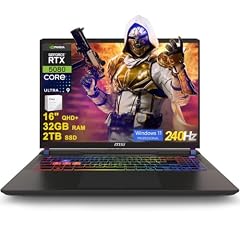
msi Vector 16 HX AI Gaming Laptop 16" QHD+ IPS 240Hz Intel 24-core Ultra
- CPU
- Intel Core Ultra 9 275HX
- GPU
- GeForce RTX 5080
- GPU memory
- 16 GB
- RAM
- 32 GB
- Storage
- 2000 GB
- Screen
- 16 in
- Refresh
- 240 Hz
- OS
- Windows 11 Pro
$2,939.23 price as of 2026-10-10 04:22 UTC (Details)
It is the first 16GB pick with 32GB of RAM rather than 64GB, so it ranks below the 64GB 16GB machines. It keeps 16GB of graphics memory, a 240Hz screen, and 2TB of storage.
Pros
- 16GB of graphics memory on a GeForce RTX 5080
- 240Hz screen refresh
- 2TB storage
- 32GB of RAM for a game, voice chat, and a stream
Cons
- 32GB of RAM, less than the 64GB picks above
- Weight not stated by the seller
Good fit if
- A player who wants 16GB of graphics memory on a GeForce RTX 5080 with 32GB of RAM
- A player who wants a 240Hz 16-inch screen
Skip if
- A player who wants 64GB of RAM for many background programs should look at the 64GB picks
- A player who needs the weight stated by the seller should check listings with that spec
Verdict: The MSI Vector 16 HX AI with 32GB of RAM is the entry point to the 16GB graphics memory tier in this guide.
8 12GB RTX 5070 Ti with 64GB RAM

Acer Predator Helios Neo 16S AI Gaming Laptop
- CPU
- Intel Core Ultra 9 275HX
- GPU
- RTX 5070 Ti
- GPU memory
- 12 GB
- RAM
- 64 GB
- Storage
- 2000 GB
- Screen
- 16 in
- Refresh
- 240 Hz
- Weight
- 2.3 kg
This is the first 12GB pick. It has 12GB of graphics memory, 64GB of RAM, and a 240Hz screen, which puts it ahead of the 12GB machines with 32GB of RAM.
Pros
- 12GB of graphics memory on an RTX 5070 Ti
- 64GB of RAM
- 240Hz screen refresh
- 2.3kg weight
Cons
- 12GB graphics memory is the entry tier in this shortlist
- 2TB storage, half the 4TB storage of some picks
Good fit if
- A player who wants 12GB of graphics memory and 64GB of RAM in a 2.3kg 16-inch laptop
- A player who wants a 240Hz screen
Skip if
- A player who wants 16GB or 24GB of graphics memory should look above this 12GB tier
- A player who wants more than 2TB of storage should compare the 4TB picks
Verdict: The Acer Predator Helios Neo 16S AI is a strong 12GB-tier choice for players who want 64GB of RAM and a 240Hz screen.
9 12GB graphics memory and 64GB RAM

Acer Predator Helios Neo 16S AI Gaming Laptop
- CPU
- Intel Core Ultra 9 275HX
- GPU
- GeForce RTX 5070 Ti
- GPU memory
- 12 GB
- RAM
- 64 GB
- Storage
- 2000 GB
- Screen
- 16 in
- Refresh
- 240 Hz
- Weight
- 2.3 kg
It also states 12GB of graphics memory, 64GB of RAM, and a 240Hz screen, so it follows the first Acer in the 64GB group. The 2.3kg weight is among the lightest in this guide.
Pros
- 12GB of graphics memory on a GeForce RTX 5070 Ti
- 64GB of RAM
- 240Hz screen refresh
- 2.3kg weight
Cons
- 12GB graphics memory is the entry tier in this shortlist
- 2TB storage, half the 4TB storage of some picks
Good fit if
- A player who wants a 12GB GeForce RTX 5070 Ti and 64GB of RAM
- A player who wants a 240Hz screen in a 2.3kg 16-inch laptop
Skip if
- A player who wants 16GB or 24GB of graphics memory should look above this 12GB tier
- A player who wants more than 2TB of storage should compare the 4TB picks
Verdict: The Acer Predator Helios Neo 16S AI with 64GB of RAM is another 12GB-tier pick with a 240Hz screen.
10 12GB graphics memory and 4TB of storage

acer Predator Helios Neo 16S AI Gaming Laptop
- CPU
- Intel Core Ultra 9 275HX
- GPU
- GeForce RTX 5070 Ti
- GPU memory
- 12 GB
- RAM
- 64 GB
- Storage
- 4000 GB
- Screen
- 16 in
- Refresh
- 240 Hz
- Weight
- 2.3 kg
This Acer stays in the 12GB 64GB group with a 240Hz screen and 4TB of storage, the most storage among the 12GB picks. It ranks after the other 64GB 12GB machines by pool order.
Pros
- 12GB of graphics memory on a GeForce RTX 5070 Ti
- 64GB of RAM
- 4TB of storage
- 240Hz screen refresh
Cons
- 12GB graphics memory is the entry tier in this shortlist
- Seller does not state screen type in the specifications
Good fit if
- A player who wants 12GB of graphics memory and 4TB of storage
- A player who wants 64GB of RAM and a 240Hz screen
Skip if
- A player who wants 16GB or 24GB of graphics memory should look above this 12GB tier
- A player who wants more than a 16-inch screen should look at the 18-inch picks
Verdict: The Acer Predator Helios Neo 16S AI with 4TB storage is the 12GB-tier pick for a large game library.
11 12GB graphics memory and an 18-inch screen

ASUS ROG Strix G18 18” Gaming Laptop
- CPU
- Intel Core Ultra 9 275HX
- GPU
- RTX 5070 Ti
- GPU memory
- 12 GB
- RAM
- 32 GB
- Storage
- 2000 GB
- Screen
- 18 in
- Refresh
- 240 Hz
- Weight
- 3 kg
$3,199.99 price as of 2026-10-10 04:20 UTC (Details)
The ASUS drops below the 64GB 12GB machines because it states 32GB of RAM. Its 18-inch screen and 240Hz refresh are the reasons to consider it despite the RAM difference.
Pros
- 12GB of graphics memory on an RTX 5070 Ti
- 18-inch screen with 240Hz refresh
- 32GB of RAM
- 2TB of storage
Cons
- Operating system not stated by the seller
- Weighs 3kg, more than the 2.3kg Acer 16S picks
Good fit if
- A player who wants a 12GB RTX 5070 Ti on an 18-inch screen
- A player who wants 32GB of RAM and 2TB of storage
Skip if
- A player who wants a light laptop should look at the 2.3kg Acer 16S picks
- A player who needs the operating system stated by the seller should check listings that include it
Verdict: The ASUS ROG Strix G18 is the 12GB-tier pick for players who want an 18-inch screen.
12 12GB graphics memory with a 240Hz screen

acer Predator Helios Neo 16S AI Gaming Laptop
- CPU
- Intel Core Ultra 9 275HX
- GPU
- GeForce RTX 5070 Ti
- GPU memory
- 12 GB
- RAM
- 32 GB
- Storage
- 1000 GB
- Screen
- 16 in
- Refresh
- 240 Hz
- Weight
- 2.3 kg
This Acer follows the ASUS among the 32GB 12GB picks by pool order. It pairs a 2.3kg weight with a 240Hz screen and Windows 11 Pro, though its 1TB storage is the smallest here.
Pros
- 12GB of graphics memory on a GeForce RTX 5070 Ti
- 240Hz screen refresh
- 2.3kg weight
- Windows 11 Pro
Cons
- 1TB of storage is the smallest in this shortlist
- 32GB of RAM, less than the 64GB picks above
Good fit if
- A player who wants a light 2.3kg 16-inch laptop with a 12GB GeForce RTX 5070 Ti
- A player who wants a 240Hz screen and Windows 11 Pro
Skip if
- A player who needs more than 1TB of storage should look at the 2TB and 4TB picks
- A player who wants 64GB of RAM should look at the 64GB picks
Verdict: The Acer Predator Helios Neo 16S AI is the 12GB-tier pick for players who want a light 16-inch laptop and a 240Hz screen.
Side by side
| # | Laptop | CPU | GPU | GPU memory | Rentable GPU model | RAM | Storage |
|---|---|---|---|---|---|---|---|
| 1 | Eluktronics HYDROC 16 G2R RTX 5090 Gaming Laptop | Intel Core Ultra 9 290HX | RTX 5090 | 24 GB | not stated | 64 GB | 4000 GB |
| 2 | Lenovo Legion 9i 18" WQUXGA IPS 240Hz Gaming Notebook Intel Core Ultra 9 | Intel Core Ultra 9 290HX | GeForce RTX 5090 | 24 GB | not stated | 64 GB | 2000 GB |
| 3 | msi Titan 18" Gaming Laptop | Intel Core Ultra 9 290HX | GeForce RTX 5090 | 24 GB | not stated | 64 GB | 2000 GB |
| 4 | Lenovo Legion Pro 7i Gen 10 16" Gaming Laptop | Intel Core Ultra 9 275HX | GeForce RTX 5080 | 16 GB | not stated | 64 GB | 2000 GB |
| 5 | msi Vector A16 HX 16" QHD+ 240Hz Gaming Laptop | AMD Ryzen 9 8940HX | GeForce RTX 5080 | 16 GB | not stated | 64 GB | 2000 GB |
| 6 | msi Vector 16 HX AI 16" QHD+ 240Hz Gaming Laptop | Intel Core Ultra 9 275HX | GeForce RTX 5080 | 16 GB | not stated | 64 GB | 4000 GB |
| 7 | msi Vector 16 HX AI Gaming Laptop 16" QHD+ IPS 240Hz Intel 24-core Ultra | Intel Core Ultra 9 275HX | GeForce RTX 5080 | 16 GB | not stated | 32 GB | 2000 GB |
| 8 | Acer Predator Helios Neo 16S AI Gaming Laptop | Intel Core Ultra 9 275HX | RTX 5070 Ti | 12 GB | not stated | 64 GB | 2000 GB |
| 9 | Acer Predator Helios Neo 16S AI Gaming Laptop | Intel Core Ultra 9 275HX | GeForce RTX 5070 Ti | 12 GB | not stated | 64 GB | 2000 GB |
| 10 | acer Predator Helios Neo 16S AI Gaming Laptop | Intel Core Ultra 9 275HX | GeForce RTX 5070 Ti | 12 GB | not stated | 64 GB | 4000 GB |
| 11 | ASUS ROG Strix G18 18” Gaming Laptop | Intel Core Ultra 9 275HX | RTX 5070 Ti | 12 GB | not stated | 32 GB | 2000 GB |
| 12 | acer Predator Helios Neo 16S AI Gaming Laptop | Intel Core Ultra 9 275HX | GeForce RTX 5070 Ti | 12 GB | not stated | 32 GB | 1000 GB |
How we picked
This guide starts with the 23 distinct listings in the pool that match the group rule: each states a graphics card with 12GB or more of graphics memory and 16GB or more of RAM. It picks 12 of those laptops to cover the range of stated specs. The picks are ranked by stated graphics memory, then by stated RAM, then by screen refresh rate, with ties broken by the order in the pool. Laptops are compared on the specifications stated in each listing and on live prices. The catalogue does not include frame rates, power limits, fan noise, or battery life, so the guide makes no claims about them.
How to choose
What the graphics card and its memory decide
The graphics card draws the game, and graphics memory limits how much large, detailed scene data and texture data the card can hold at once. All 12 picks state at least 12GB of graphics memory. Three state 24GB, four state 16GB, and five state 12GB. A higher graphics memory tier is one reason a pick ranks higher in this guide, but a game's own requirements and settings still matter.
Refresh rate: what the screen can redraw
Refresh rate is how many times per second the screen can redraw. A 240Hz or 300Hz panel is the spec that competitive players look for, but the laptop only benefits when the game itself delivers enough frames per second. This guide ranks by graphics memory first, then RAM, then refresh rate, so a 300Hz screen can move a pick ahead only after the memory tiers are settled.
RAM when the game, voice chat, and a stream run together
RAM is room for the game, the launcher, a browser, voice chat, and a stream or capture program to be open together. Seven of the 12 picks state 64GB of RAM, and five state 32GB. Players who keep many programs open alongside a game may prefer the 64GB group.
Screen size and weight when the laptop travels
A larger screen shows more of the game, and a lighter laptop is easier to carry to a LAN event or between rooms. This guide includes three 18-inch picks and nine 16-inch picks. Among 16-inch machines, the Acer Predator Helios Neo 16S listings state 2.3kg, the lightest stated weight in the guide.
Operating system and storage in this shortlist
Most picks state Windows 11 Pro, and one 16-inch Acer states Windows 11 Home. The seller does not state an operating system for the ASUS ROG Strix G18. Storage across the picks ranges from 1TB to 4TB, so players with a large game library can choose the 4TB machines or plan around a 1TB drive.
What this guide leaves out (and why)
The catalogue has no data for frame rates, fan noise, battery life, thermals, keyboard feel, or display brightness in color terms. This guide does not guess those numbers. It compares laptops on the specifications stated in each listing and on live prices, so players should check the maker's own product page for details the seller does not state.
Questions
Why are laptops with 16GB or 24GB of graphics memory in a 12GB guide?
The filter for this guide is 12GB or more of graphics memory. Every pick states at least 12GB, and the guide ranks the higher memory tiers first. Three picks state 24GB, four state 16GB, and five state 12GB. That lets a player compare the full memory range in one list instead of searching each tier separately.
Does this guide cover frame rates, fan noise, or battery life?
No. The catalogue does not include data for frame rates, fan noise, thermals, battery life, or keyboard feel, and this guide does not guess them. Laptops are compared on stated specifications and live prices. Players who need those details should check the maker's product page or system requirements for the games they play.
What does 12GB of graphics memory do for a game?
Graphics memory holds the scene geometry, textures, and other visual data the graphics card needs while drawing a frame. More graphics memory can help with larger, more detailed scenes, but it is not the only spec that matters. The CPU, RAM, screen, and the game's own requirements also affect what a player experiences.
Is a 240Hz or 300Hz screen always better?
A higher refresh rate lets the screen redraw more times per second, which is why competitive players look for it. The laptop only benefits when the game itself delivers enough frames per second to fill those redraws. A 120Hz 18-inch pick may still suit a player who prefers the larger screen.
How much RAM is enough for gaming laptops in this guide?
All picks state at least 32GB of RAM, and seven of the 12 state 64GB. RAM is room for the game, launcher, browser, voice chat, and stream or capture software to stay open together. Players who run many background programs at once may prefer the 64GB group.
Recent updates
- : First published.